


Sources hub
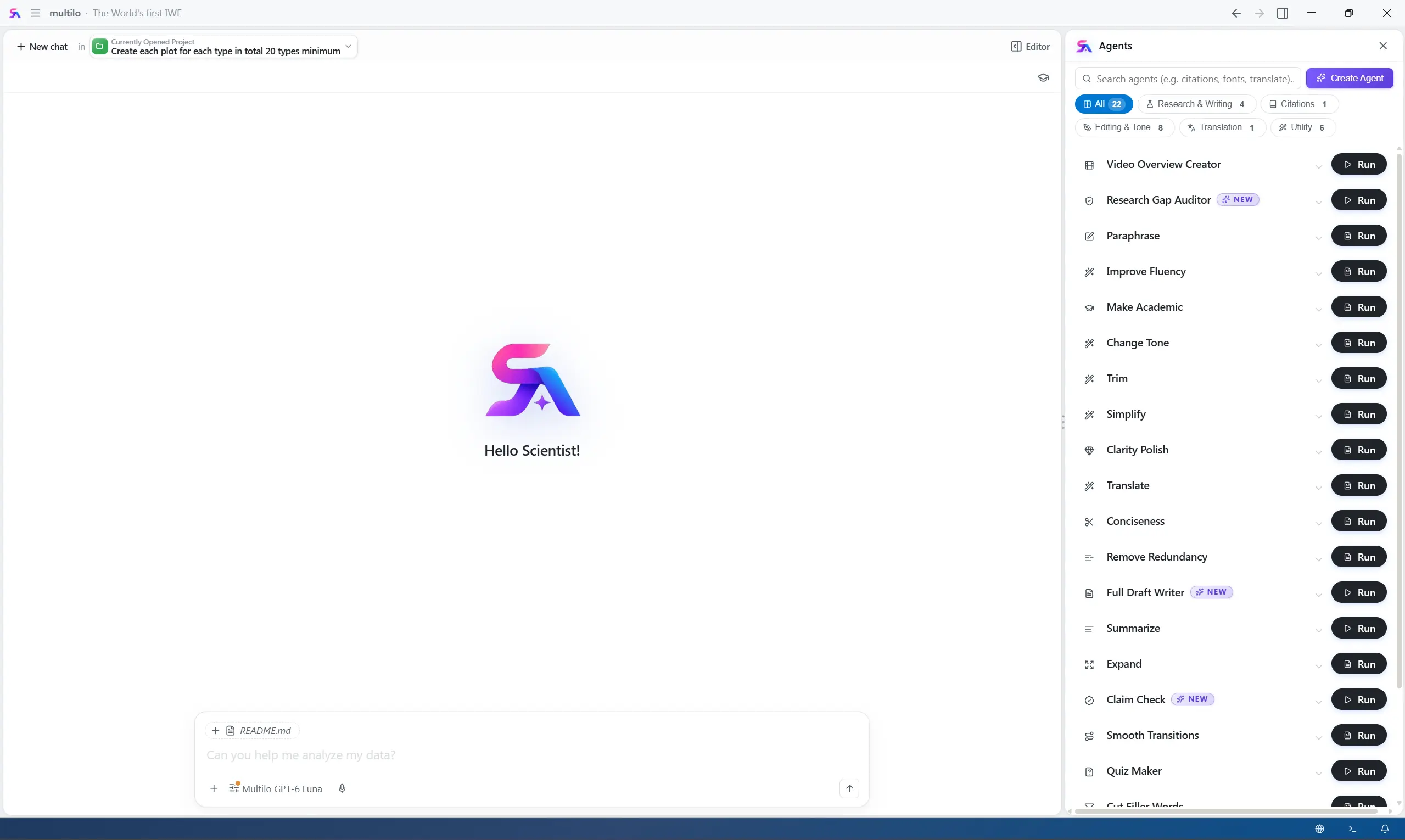
Works as your reference finder — finds relevant papers from your library and the open literature and adds them to your research project with one click.

I draft full theses — in one click.
Try it freeTrusted by researchers at universities and labs worldwide





Multilo is your Agentic Academic Research and Development Workspace that understands not just your Paper library, but the full Context of your Research Project.
As you write, Multilo keeps the flow of the paper consistent and suggests what should come next in the paragraph, so you never get stuck in the middle. Moreover, it doesn’t show you only one citation; instead, it gives you every source that supports that sentence, so you can choose the strongest reference that fits perfectly for your argument. Multilo provides in-line writing suggestions and automatically saves your selected citations, so you can focus on writing and insert your references with one click at the end.
Multilo never provides you with AI-generated text or citations to papers that don’t even exist — a common problem with generic AI tools. Instead, you can verify the source by clicking the citation, and the complete paper opens beside your draft with the exact passage highlighted, so you can compare the Multilo sentence to the original paper side-by-side and decide whether to add the citation or not.
Starting a research project without knowing the structure and requirements is actually frustrating. That’s why Multilo gives you a starting point where you have to give the topic and target length, and Multilo researches all the literature, drafts every section in your required voice, and attaches authentic citations to it. What you get is a first structured draft built from real sources — ready for you to revise, refine, and then defend with confidence.
If your draft is ready but you’re finding it difficult to check whether it’s ready for submission or not, run Claim Check on a finished section or your whole draft — it’s the best solution for submission readiness. Multilo re-reads each sentence, cross-checks it with the cited source, and flags any statement that is overstated, irrelevant, misread, or left unsupported, so you can fix any problems right away before submission. It also flags when the tone drifts from the rest of your paper, so the whole draft reads as one voice.
Some research papers take hours to read to determine whether they’re relevant to your literature review. That’s why Multilo transforms uploaded papers, PDFs, and notes into short, animated video summaries that highlight the key findings, concepts, and insights. Instead of reading every page, let Multilo summarize the entire document in a video or chat with the PDF, helping you quickly decide whether it’s worth using in your research.
Beyond drafting and citing, Multilo agents handle all your research workflow efficiently, and you get to use every agent within your project window. No need to replace tabs for different services
Works as your reference finder — finds relevant papers from your library and the open literature and adds them to your research project with one click.
Translate your whole paper into 30+ languages while keeping the tone, claims, terms, and citations intact.
checks your draft against your field literature and flags the gaps missing in your argument.
Write the results section with your actual findings by importing the data files, running the data analysis, and drafting the section accordingly.
By following Prisma structure, write and refine the systematic literature review efficiently, end-to-end.
Spot broken chapter structure and fix each section’s hierarchy issues.
Keep your history private and stored so you can roll back anytime if you miss any detail.
Select any way of refining the data — whether you want to paraphrase the text in an academic tone, expand one line into a dedicated paragraph, or summarize the whole page into one paragraph — Multilo does all that for you. Plus, you can switch the citation style of the entire bibliography with one click, so simplify your research writing with our enhanced AI academic writer — Multilo.
AI research writing workspace

Work on your thesis, dissertation, or research proposal on one platform with all the necessary tools.

Manage your personal research engine with our broad access to literature across different subjects.

Prepare manuscripts and research proposals for journal submissions with accuracy and a seamless process.

Keep the citation style and terminology consistent across co-authored papers with the best AI research assistant for academics — Multilo.
Looking for a Jenni AI or Paperpal alternative that works best among them and edits your Word file more efficiently? Here is how Multilo differs from other AI tools
| Feature | Multilo | ChatGPT / Claude | Jenni AI | Word + Copilot |
|---|---|---|---|---|
| Drafts from real published sources | Yes | No | Yes | No |
| Citation traceable to source passage | Yes, highlighted | No | Partial | No |
| Verifies claims after drafting | Yes | No | No | No |
| Needs a separate plagiarism checker | No | Yes | Yes | Yes |
| Edits your native .docx file | Yes | No | No | Yes |
| Scoped to your own research library | Yes | No | Partial | No |
| Files stay local | Yes | No | No | Partial |
| Works offline | Yes | No | No | No |
| Built for thesis & journal submission | Yes | No | Yes | No |
Drafts from real published sources
Citation traceable to source passage
Verifies claims after drafting
Needs a separate plagiarism checker
Edits your native .docx file
Scoped to your own research library
Files stay local
Works offline
Built for thesis & journal submission
See exactly where Multilo’s citation verification and local-first drafting go further
Multilo runs locally on your device. Your drafts, uploaded papers, and your notes stay private — nothing is uploaded, no copy is kept on our side, and only the selected documents that you choose to search in the open literature are given to AI. Plus, Multilo never uses your writing to train a model, and all your unpublished research stays yours.
See what researchers and academic writers say about Multilo
This is really an amazing software. Especially the Full Draft writer, i love it.
Multilo software is future of research. I wish i had multilo long before! This company really understood researchers pain points.
This software may be the future of research, it made research much easier and helpful. i want them grow fast tbh, because their growth is growth of researchers. Wish you success multilo!
Opposing to many of my colleagues, i believe software's like multilo are very helpful for students, this is the future of research.
I love the suggestions function in multilo
Full Draft writer is amazing in multilo
The way Full draft do the magic is crazzy. I love that! like i jusst give it the title and the magic happened.
A free tier with included monthly AI credits. Paid plans add more credits, premium models, and team features
Try the desktop app with a small monthly credit allowance.
Everyday writing, research, and code help.
Heavy thesis, dissertation, and lab work.
Try the desktop app with a small monthly credit allowance.
Everyday writing, research, and code help.
$100/ year
Heavy thesis, dissertation, and lab work.
$390/ year
Prices in USD, billed yearly. See monthly billing, team, and enterprise plans on the full pricing page.
Multilo isn’t a generic AI tool — it’s a professional IWE (Integrated Writing Environment) built for research. Upload your papers, build a library, and chat with Multilo about your sources. It prepares drafts from real published sources and, for authentication, adds citations to them. Every claim can be checked against the original paper, making it more reliable and authentic AI thesis or dissertation writing assistance. Multilo delivers precise, academic-standard content without needing extensive prompting, as it’s built specifically to assist you in research writing.
Multilo supports a wide variety of citation styles, including APA, MLA, Chicago, Harvard, AMA, IEEE, and many others, and each style has an updated version, such as APA 7th or MLA 9th. You can choose any style, and Multilo transforms your whole bibliography into that specific style.
Definitely. Multilo works for every type of academic writing, including essays, coursework, and journal manuscripts, as well as help with AI thesis and dissertation writing. Plus, it supports multiple languages to help non-native English writers reach a clear academic tone without misrepresenting anything.
Yes. Multilo brings the Cursor-style approach — AI paired directly with your work — to academic writing. It understands academic structure and citation styles the way Cursor understands code. Instead of source files, you’re working in your actual .docx file, and every citation gets checked against the real source before you trust it.
Copilot doesn’t provide source verification and writes from general web and trained data. In contrast, Multilo drafts only from real published research and shows you the exact passage behind every citation.
Multilo is a desktop application available for Windows, macOS, and Linux.
Download Multilo and turn a blank page into a submission-ready draft — with every citation traceable to the original paper