New

Free session: How to write an effective literature review Using AI, July 30,2026

Register
NewWhat shipped this month

Multilo vs. NotebookLM—Which One Actually Writes Your Paper With You

Draft, cite, and verify in one desktop app — on the document you'll actually submit. The best NotebookLM alternative: same source Q&A and video overviews, plus full drafting and citation verification NotebookLM doesn't have.

Trusted by researchers at universities and labs worldwide

Multilo vs. NotebookLM— side-by-side comparison

See the clear difference where Multilo’s desktop workspace delivers more seamless research assistance than NotebookLM.

  • Draft full, cited sections from a topic

    Multilo

    Yes—Full Draft Writer

    NotebookLM

    No, summarizes uploaded sources only

  • Chat with your own project's sources

    Multilo

    Yes—Talk to Your Project

    NotebookLM

    Yes, notebook Q&A

  • Citation traced to exact source passage

    Multilo

    Yes, highlighted

    NotebookLM

    Document-level only

  • Audits your own draft for weak claims

    Multilo

    Yes—Claim Check

    NotebookLM

    Not offered

  • Edits your native .docx file

    Multilo

    Yes, directly

    NotebookLM

    No, separate notebook interface

  • Inline suggestions pulling from multiple sources at once

    Multilo

    Yes—multi-source suggestions

    NotebookLM

    Not offered

  • Organizes sources into one project library

    Multilo

    Yes — Sources Hub

    NotebookLM

    Per-notebook uploads only

  • Offline, local-first desktop app

    Multilo

    Yes

    NotebookLM

    Cloud-based only

  • Free plan available

    Multilo

    Yes, with monthly AI credits

    NotebookLM

    Yes

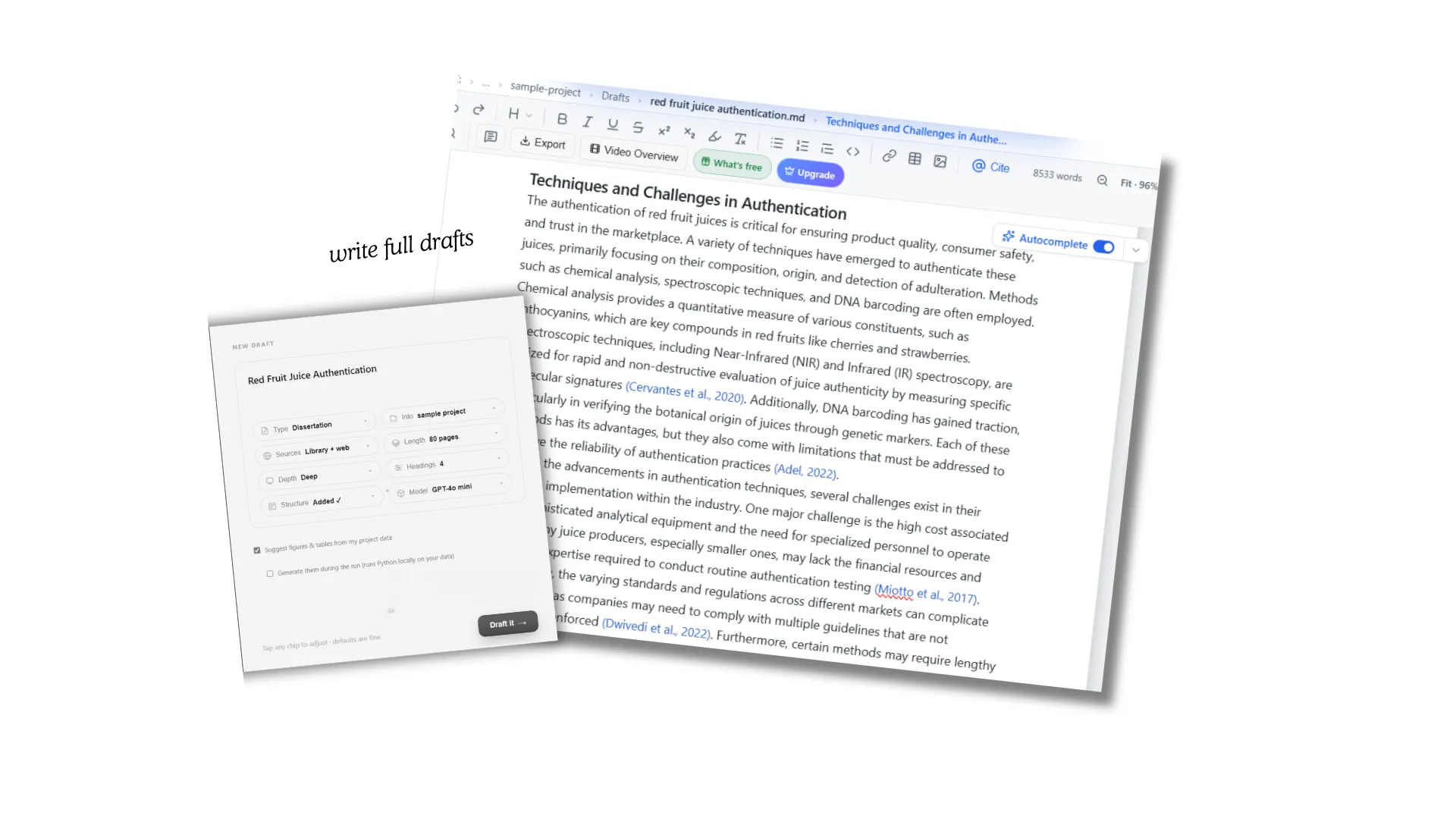
See Your First Draft In One Sitting

Give multilo a topic, target length, research type (thesis, dissertation, research paper, etc.), and proper instructions regarding tone and structure; it researches, cites, and drafts each section for you.

Output

Write Faster and Let Citations Follow the Research

With Multilo, you can write a full draft by giving just a topic name, length required, and other specific instructions; it researches the literature, structure, every section and writes a full draft from introduction to conclusion with authentic citations and clear formatting.

While NotebookLM only answers your questions, summarizes the material you upload, and gives explanations just like other AI tools. It doesn't independently draft new sections.

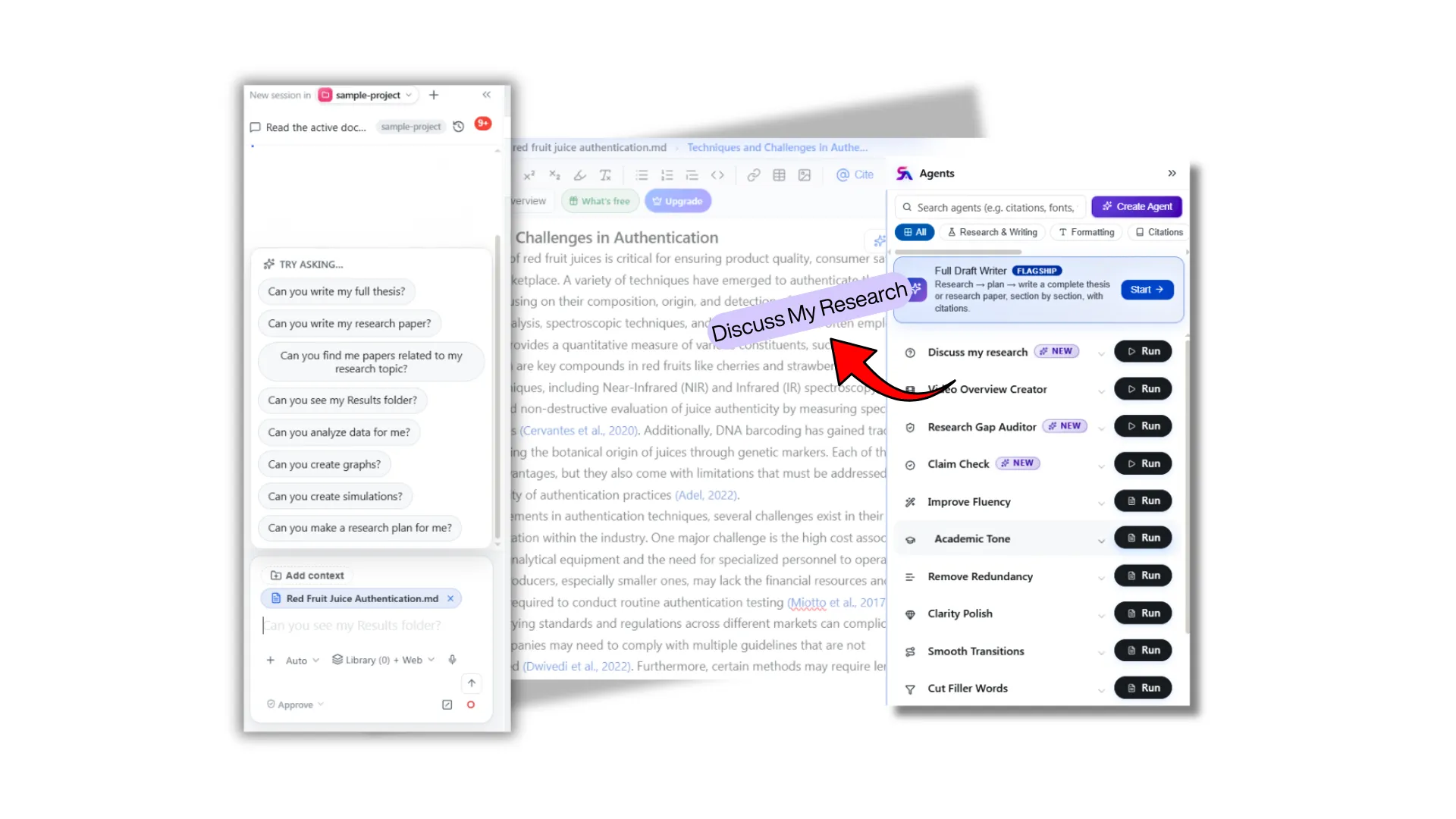
Talking to your source

Ask Your Sources Questions Without Breaking Focus

Multilo’s “Discuss My Project” agent lets you ask questions and get explanations across your entire source library without leaving the draft window. Chat works beside the draft so you can understand and write simultaneously. The answers you get are never AI-written; instead, they are directly extracted from the papers you have uploaded. 

In contrast, NotebookLM also provides library-based responses, but it runs on a separate tab, so you’ll need to copy the useful responses and edit them yourself in your document

Submission readiness

Audit Your Draft and Fix Weak Claims Before Review

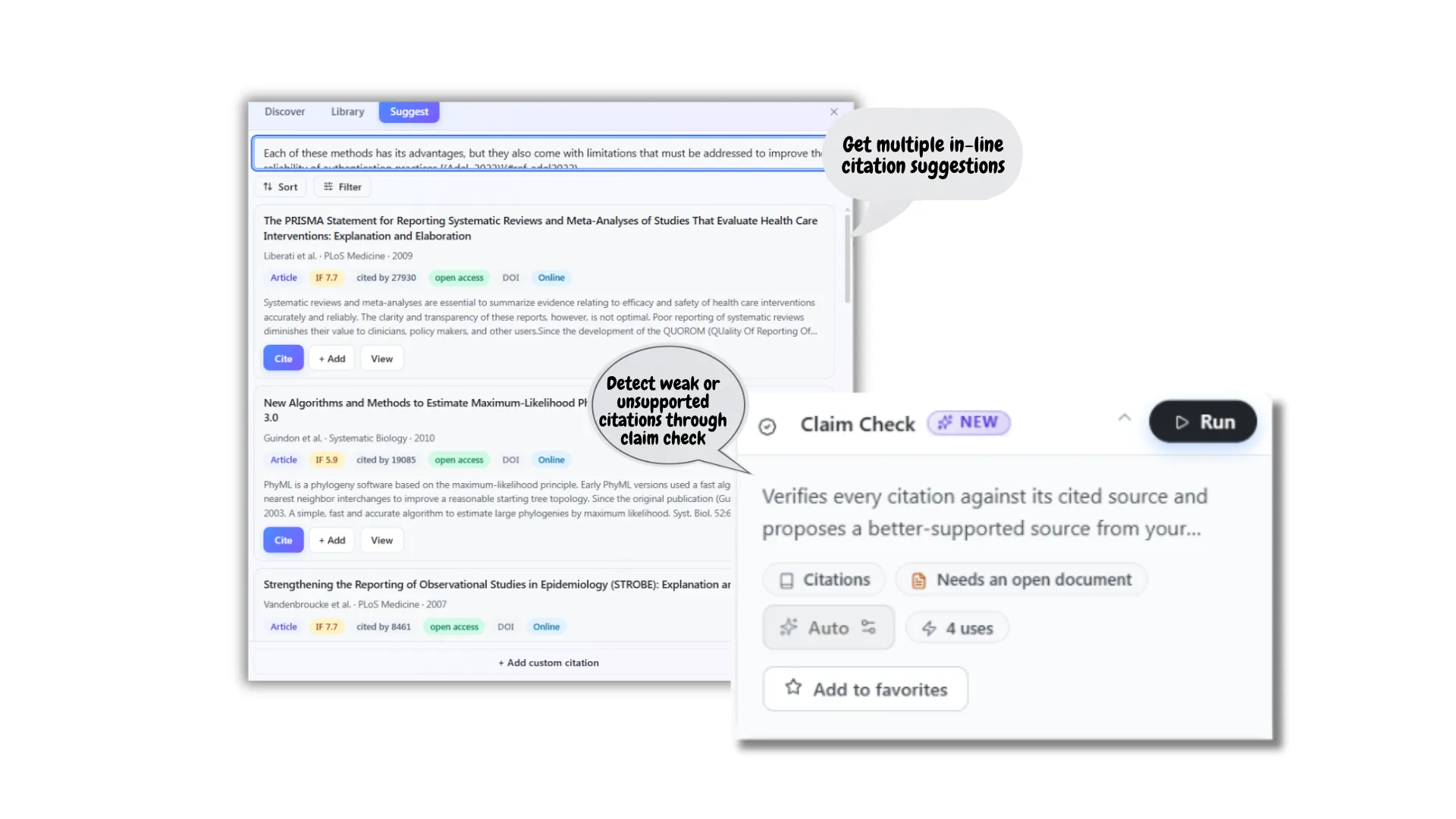
Multilo runs a claim check on your full draft, re-reads every citation, cross-checks it with the real source, and flags any overstated and unsupported claims. It will strengthen your claim and reduce advisor revisions. It will also allow you to verify each citation side by side with the original paper so you can submit it with confidence.

However, NotebookLM works differently. It is built to explain your sources, not to review a draft you have already written. It can provide you with information about the specific paper you upload, but it falls short when you ask it to review your draft against real sources.

Citation depth

Same citation, different depth

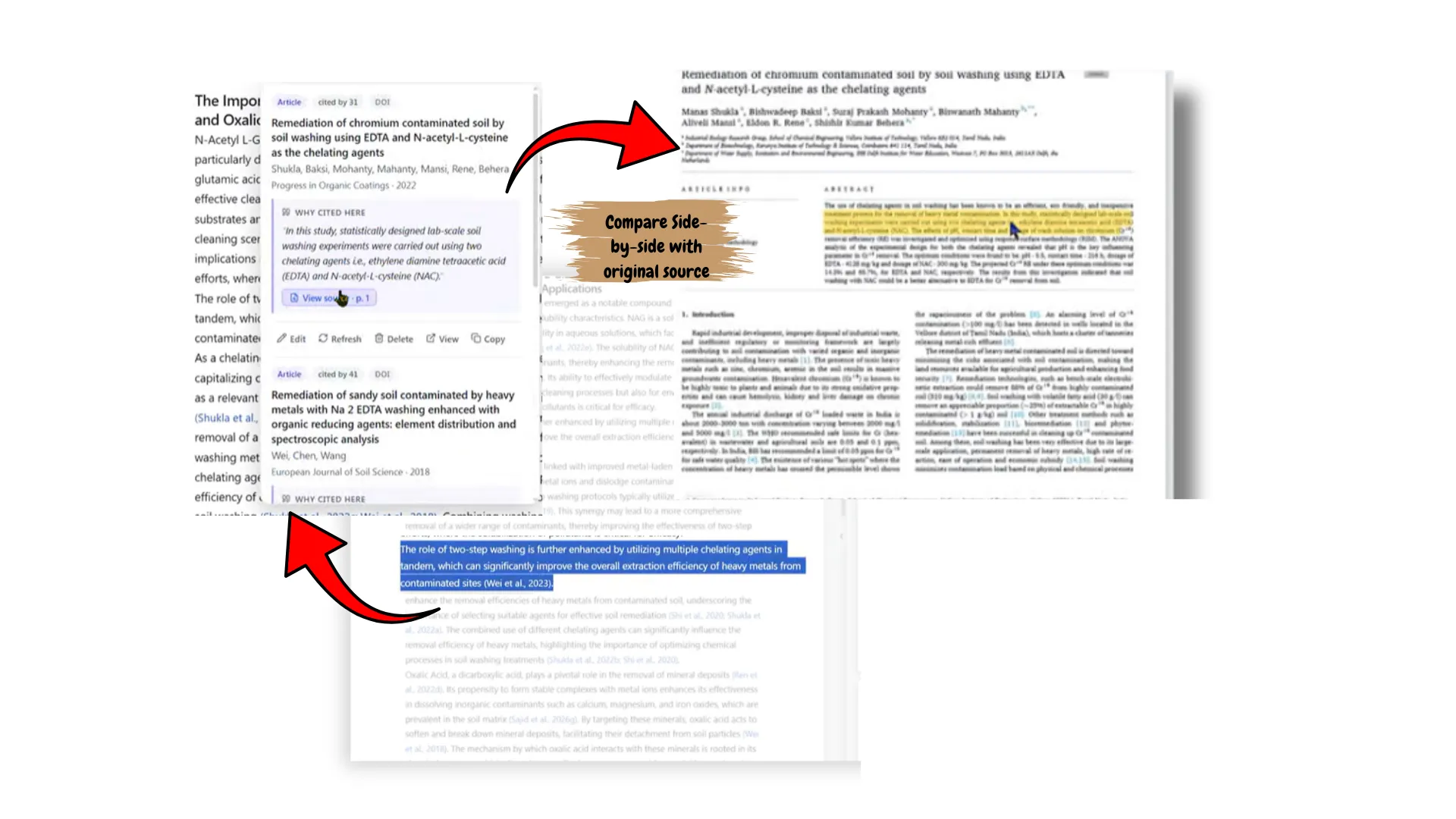
Both tools cite sources, but their approach is different. Multilo researches your whole library and also derives data from web sources that you can verify yourself. It opens the original source next to your draft and highlights the specific text that is taken from that source so you can see whether the citation backs the sentence and if it is a strong citation related to your topic.

On the other hand, the notebook just works on the uploads and cites at the document level. It just tells you from which document this text is taken. 

Get all of this in one local-first app

Downnload Multilo

Streamline the writing process from draft to submission

Here is what researchers and students working on their research project get when they work with Multilo. Not just the summaries and explanation, it is a workspace where you actually work and cite with agents' help at every step.

Hours back on your calendar

With Multilo, you’ll cover less time reading every paper from start to end just to know if it is relevant or not. Multilo explains it for you, suggests relevancy, and also generates video illustrations for you for better understanding.

Confidence walking into submission

Every claim written on your paper is backed by the authentic citation and checked before submission. Every change is done when you accept the suggestion; multilo doesn't add claims that you do not approve.

Fewer revision cycles with your advisor

Multilo works on every section thoroughly during full draft writing and then provides you with multiple suggestions line by line to fill any gaps. Plus, every unsupported claim is flagged before submission so you can fix it right away.

Peace of mind about academic integrity

Unlike generic AI tools that give citations that don’t even exist and make up sentences, Multilo doesn't produce AI-generated text; instead, it drafts from real, traceable sources, reducing the risk of fabrication and unauthenticity.

A consistent voice across long document

From introduction to conclusion, the tone is kept consistent the way you want it to be. Before drafting a full paper, you give necessary instructions like sections, length, tone, alignment, etc. Everything is done according to your style.

Control over where your work lives

Writing on our desktop workspace means all your unpublished thesis or research writings are saved on your personal computer and not on our servers.

REAL, DEFENSIBLE GAPS ONLY

Find a gap your reviewer can't immediately knock down

Multilo identifies research gaps from your library, challenges each one, and then presents you only the ones that survived—helping you analyze extensive papers faster and uncover evidence-backed research gaps that you can defend confidently.

Diagnoses your libraryNo guessingSignificance checkVerbatim evidence

Frequently asked questions

Is Multilo the best NotebookLM alternative?

Comparing both tools comes down to a single question. Do you need a tool that explains your research only or a complete workspace where you draft each section, get explanations of each claim, understand your sources, cite as you write, and refine each line without leaving the project window?

All this is offered by Multilo, which works on your computer and finishes your academic document inside your .docx file. Researchers often prefer Multilo when working on long research documents such as thesis, dissertations, research papers, case studies, essays, etc., because you can write, research, and understand at the same time in one place.

Can NotebookLM draft a thesis or research paper?

NotebookLM can summarize and answer questions from the uploaded papers in your library and give you audio or slide overviews, but it is not built to draft sections with complete citations from web sources.

Does Multilo verify citations the same way NotebookLM does?

Both Multilo and NotebookLM use different approaches for citation verification. NotebookLM describes “this paper says that '...'," while Multilo takes you to the original paper from your library and highlights the exact section for you. It goes deeper in verification, and it happens inside your Multilo workspace, where the original paper is shown side by side to your draft.

Furthermore, Multilo’s claim check agent is specific, which checks every citation against real sources and identifies the relevancy, while NotebookLM doesn't offer that.


Can Multilo help me anticipate objections to my argument?

Yes, Multilo's "Counterargument Weaver" agent reviews your whole draft and anticipates the strongest objections that a reviewer may question and ask for explanation and authenticity proof. Multilo helps you address them before submission and helps you understand it in a better way.

Can Multilo test how well I understand my own sources and draft?

Yes, you can develop quizzes using its quiz maker agent. It generates MCQs or mixed questions based on your draft and material you provide. So you can practice it in real time.